
Allergen Safety POS: Protect Customers at Events

An allergen safety POS is a point of sale system that flags allergens on every menu item, displays warnings to staff and customers, and keeps a timestamped record of what was sold. For Australian event vendors, it's the fastest way to meet food safety obligations and protect customers with allergies. Evntle POS builds allergen declarations and warning badges directly into item cards and the order cart, so your team sees the risk before the sale is finalised — no spreadsheets, no sticky notes, no guesswork.

If you've ever watched a customer ask "does this have sesame in it?" while a queue builds behind them, you already know why allergen safety matters at markets. It's not just a compliance box — it's the difference between a smooth service and a serious incident. This guide covers what an allergen safety POS does, how to set one up, and why it's become standard kit for food vendors across Australia.
What Is an Allergen Safety POS and Why Does It Matter?
An allergen safety POS is a point of sale system with built-in allergen tracking. Every menu item carries an allergen declaration — nuts, dairy, gluten, egg, soy, sesame, shellfish, fish, sulphites, lupin. When a vendor taps that item at checkout, the POS shows the allergen warning to staff and, where relevant, to the customer on a display.
Why does this matter? Because food allergies affect around 1 in 10 infants and 1 in 20 adults in Australia, according to the National Allergy Council. That's a lot of market-goers reading every label and asking every question. Add the fact that Australia has one of the highest rates of food allergy in the world, and you can see why a manual process simply doesn't hold up on a busy Saturday morning.
An allergen safety POS replaces memory, sticky notes, and guesswork with a system that flags allergens on every item, every time. It protects customers and protects your business.
What is an allergen safety POS, in plain English?
It's a POS with three jobs: tag allergens on every item, warn staff and customers at the point of sale, and keep a record of what was sold. If your current POS can't do all three, it isn't an allergen safety POS — it's just a till.
Why allergen safety is a legal issue, not a nice-to-have
Under the Food Standards Code (Standard 3.2.2) and state-based food laws, food businesses must be able to tell customers what's in the food they sell. At a market stall, this is often verbal — but verbal relies on memory, and memory fails at 11am on a hot day. A POS that shows allergen warnings on the item card removes that single point of failure.
For a deeper look at the compliance side, see our guide to food safety compliance for market vendors in Australia.
How Allergen Safety POS Works on Event Day
Here's how an allergen safety POS like Evntle POS runs on a typical market day.
- Set up your menu with allergen tags. Every item gets tagged with its allergens during setup. Pre-built templates for food businesses make this fast — most vendors finish in under an hour.
- Staff see warnings at the point of sale. When an item is tapped, allergen badges appear on the item card and in the order cart. No one has to remember anything.
- Customers see warnings on the display. Pair the POS with a customer-facing display or order board so the warning is visible to the person buying.
- Every sale is logged. The POS records what was sold, when, and by whom. If a query comes up later, you have a timestamped record.
- Stock and allergens stay in sync. If an item sells out or a recipe changes, the allergen tag updates with it.
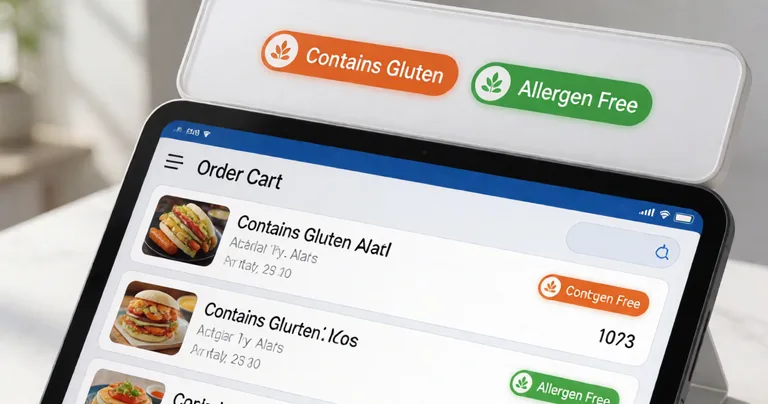
Evntle POS works on phone, tablet, or desktop, syncs in real time across devices, and runs in offline mode — critical when the market's Wi-Fi drops out mid-service. It accepts cash and card (Zeller EFTPOS), handles split payments, and prints thermal receipts with allergen notes if you want them.
Pair your POS with Evntle Order Board so allergen warnings show on the customer-facing display. It cuts repeat questions and speeds up service at the counter.
Allergen Safety POS vs Manual Methods: A Comparison
Plenty of vendors still run allergen tracking on paper. Here's how that stacks up against a purpose-built allergen safety POS.
| Method | Speed at checkout | Accuracy under pressure | Record keeping | Customer confidence |
|---|---|---|---|---|
| Memory only | Fast | Low | None | Low |
| Paper allergen chart | Slow | Medium | Manual | Medium |
| Sticky notes on the till | Medium | Low | None | Low |
| Allergen safety POS (Evntle) | Fast | High | Automatic, timestamped | High |
The pattern is consistent: manual methods fail exactly when you need them most — during the lunch rush, when the queue is longest and the stakes are highest.
"At a market, you don't get a second chance to answer an allergen question correctly. The POS has to be the source of truth, not the person on the till."
— Evntle vendor operations team
How Do I Set Up Allergen Warnings on My POS?
Setting up allergen warnings is one of the simplest parts of getting your stall event-ready. Here's the process on Evntle POS.
Step 1: Choose your business template
Evntle's quick setup templates are pre-built by business type — food, clothing, crafts, produce, jewellery, services. Pick "food" and your POS is pre-configured with allergen declaration fields and warning badge options.
Step 2: Tag allergens on every item
Go through your menu item by item. Tag each with its allergens: nuts, dairy, gluten, egg, soy, sesame, shellfish, fish, sulphites, lupin. If you make allergen labels for packaged goods, our guide to creating food allergen labels covers the labelling side in detail.
Step 3: Choose your warning style
Warning badges appear on item cards and in the order cart. You can choose whether warnings are visible to staff only, or to staff and customers on the customer-facing display.
Step 4: Test in training mode
Evntle POS has a training mode so you can run through orders without affecting real sales. Test a few common allergen scenarios before event day.
Step 5: Train your staff
Show every team member where the warnings appear and what to do when a customer asks a follow-up question. Thirty minutes of training prevents most incidents.
Allergen tags must be updated whenever a recipe changes. A stale tag is worse than no tag — it gives false confidence. Make it part of your pre-event checklist.
Key Features of an Allergen Safety POS
Not every POS is built for allergen safety. Here are the features that matter for Australian event vendors.
| Feature | What it does | Why it matters at events |
|---|---|---|
| Allergen declarations on item cards | Tags each menu item with its allergens | Staff see the warning before the sale is finalised |
| Warning badges in the order cart | Repeats the warning at checkout | Catches last-minute changes and split orders |
| Customer-facing display | Shows warnings to the buyer | Builds trust and reduces repeat questions |
| Offline mode | Keeps working when Wi-Fi drops | Markets and festivals often have patchy connectivity |
| Timestamped sales log | Records what was sold, when, and by whom | Essential for incident follow-up and compliance |
| Multi-device sync | Syncs POS across phone, tablet, desktop | Lets you add a second till during peak periods |
Evntle POS includes all of these as standard. It also integrates with Evntle KDS for food vendors managing orders during a rush — the KDS shows the same allergen warnings on the kitchen display, so the message is consistent from order to service.
Allergen Safety POS and Australian Compliance
Australia's food safety framework is clear: if you sell food, you must be able to tell customers what's in it. For market vendors, this is enforced by local councils and state health departments, and the requirements vary slightly by state.
What the Food Standards Code requires
Standard 3.2.2 of the Food Standards Code requires food businesses to have a food safety supervisor and to be able to identify and manage food safety risks — including allergens. For packaged food, allergen labelling is mandatory. For unpackaged food sold at a stall, the requirement is that accurate allergen information is available on request.
How a POS helps you comply
A POS with allergen tracking turns a verbal obligation into a documented one. Every sale is logged with its allergen tags. If a council officer or a customer asks, you have a record. It's not a substitute for a food safety supervisor, but it's a strong operational control.
For the full compliance picture, including state-by-state differences and food safety supervisor requirements, see our guide to food safety compliance for market vendors in Australia.

Why Allergen Safety POS Belongs in Your Event Stack
Allergen safety doesn't sit alone. It's part of a wider event commerce setup that includes payments, order management, stock, and customer engagement. Evntle brings these together in one platform, so allergen data flows from the POS to the KDS to the order board without double entry.
If you're still weighing up hardware options, our comparison of cashless terminals versus mobile POS covers the trade-offs for market stalls. And if you're setting up your first stall, choosing a market stall POS system walks through what to look for.
"Allergen tracking isn't a feature you bolt on later. It's a design decision — and it shows in how smoothly a stall runs when the queue is ten deep."
— Evntle product team
Frequently Asked Questions
Q: What is an allergen safety POS?
A: An allergen safety POS is a point of sale system that tags allergens on every menu item, displays warnings to staff and customers at checkout, and keeps a timestamped record of sales. It replaces manual allergen tracking with a system that works under pressure.
Q: How do I set up allergen warnings on my POS?
A: Choose a food business template, tag each menu item with its allergens, choose whether warnings show to staff only or to customers too, test in training mode, and train your team. On Evntle POS, most vendors complete setup in under an hour.
Q: Is allergen tracking a legal requirement for market vendors in Australia?
A: Yes. Under the Food Standards Code and state food laws, food businesses must be able to tell customers what's in the food they sell. A POS with allergen tracking gives you a documented, timestamped record of every sale.
Q: What's the best allergen safety POS for Australian event vendors?
A: The best option is a POS built for event day: allergen tags on item cards, warning badges in the order cart, offline mode, multi-device sync, and a customer-facing display. Evntle POS includes all of these as standard.
Q: Can I add allergen warnings to my existing menu without redoing everything?
A: Yes. Evntle's quick setup templates let you tag allergens on existing items without rebuilding your menu. You can add, change, or remove tags at any time.
Q: How does an allergen safety POS help with incident management?
A: If an allergen incident occurs, the POS log gives you a timestamped record of what was sold and when. Combined with Evntle Incident Management, you can log the incident, assign an owner, and keep a full history for the venue.
Allergen safety isn't a nice-to-have at Australian markets — it's a legal obligation and a customer trust issue. An allergen safety POS gives you the tools to get it right every time: tagged items, visible warnings, and a timestamped record of every sale. Evntle POS builds this into the same system you use for payments, stock, and order management, so allergen safety becomes part of how you run your stall — not a separate chore. Set it up once, train your team, and get back to what you do best: serving great food to happy customers.
📖 Related
See the KDS and POS in action — try the live demo or create a free account.