
Big Tech in Event Management: Australian Market Guide

Big tech is reshaping how Australian market and festival organisers run events. The real shift isn't flashy gadgets — it's integrated platforms that bring vendor applications, site planning, cashless point of sale, and compliance into one place. According to a 2024 report by the Australian Food and Grocery Council, over 68% of food and craft vendors now expect digital payment options at every event they attend. If you're still juggling spreadsheets, email threads, and three different apps, you're losing time and money. This guide breaks down how big tech thinking applies to real event operations, and how to choose tools that actually work on event day.
What Does Big Tech Mean for Event Management in Australia?
When organisers ask "what does big tech mean for event management?", the honest answer is: it's about scale without chaos. Big tech companies built their empires on cloud infrastructure, real-time data, and seamless user experiences. Those same principles now drive the best event management platforms — but sized for a 200-stall farmers market in Ballarat, not a global e-commerce giant.
The key difference is integration. A big tech approach means your vendor applications, site plan, payments, and reporting all talk to each other. No double-handling. No lost emails. No wondering whether a stallholder has actually paid their fee.
Why Integrated Platforms Beat Spreadsheets
We've all been there. A spreadsheet for applications, a folder for insurance certificates, a separate system for stall fees, and a group chat for bump-in. It works — until it doesn't. One missed payment, one vendor who never got the site map, one incident that wasn't logged properly.
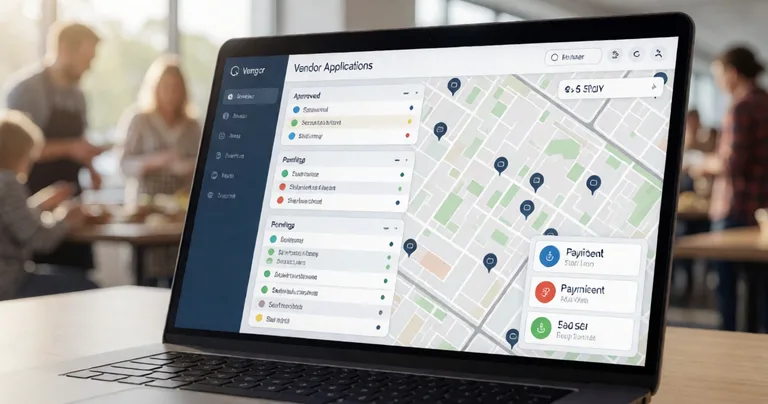
Integrated platforms solve this by design. When a vendor applies through Vendor Application Management Software, their details flow straight into your site plan, payment records, and communications. That's the big tech principle at work: one source of truth.
Before your next event, list every tool you currently use. If any two tools require you to re-enter the same vendor data, that's your biggest time leak. Fix that first.
How Do I Manage Vendor Applications Without Losing My Mind?
This is the question we hear most from Australian market organisers. And it's fair — vendor applications are where chaos starts. You've got food trucks, craft stalls, community groups, and pop-up retailers all wanting a spot. Each one needs to be screened, approved, allocated a site, and invoiced.
The big tech answer is workflow automation. A proper vendor management system lets you:
- Accept applications online with custom questions (insurance, food licence, power needs)
- Review and approve or decline with one click
- Assign stall locations directly from your site plan
- Collect documents and compliance certificates automatically
- Send offers, reminders, and event-day instructions via email or portal
- Maintain a waitlist for popular events so cancellations fill fast
Evntle's Vendor Management suite does exactly this. It's built for the Australian market context — GST-correct invoicing, public liability tracking, and stall allocation that matches your physical site layout.
Big Tech and Cashless Payments: What's the Best POS for Australian Market Stalls?
If you've ever stood at a stall watching a queue build while a customer digs for coins, you know why cashless matters. According to the Reserve Bank of Australia, contactless payments now account for over 95% of all card transactions in Australia. For market vendors, that's not a trend — it's the baseline.
But not all POS systems are built for event conditions. You need something that works on a tablet, survives patchy connectivity, and handles the reality of a busy Saturday market.
When organisers ask us "what's the best POS for Australian market stalls?", we point to three things: speed, sync, and stock accuracy. Evntle POS delivers all three. It supports cashless payments via Zeller EFTPOS, product bundles that speed up service, and multi-device sync so your front counter and kitchen display stay aligned in real time.
| Feature | Basic Terminal | Evntle POS | Why It Matters at a Market |
|---|---|---|---|
| Payment types | Card only | Card, mobile wallet, cash tracking | Some customers still carry cash |
| Multi-device | No | Yes — phones, tablets, desktop | Keeps queues moving during peaks |
| Stock control | Manual | Real-time with alerts | Prevents sell-outs and overstocking |
| Allergen tracking | None | Built-in warnings and labels | Compliance and customer safety |
| Reporting | End-of-day total | Live dashboard + peak hour heatmaps | Informs staffing and stock decisions |
Evntle POS syncs across devices in real time. If your internet drops, transactions queue locally and sync when you're back online — no lost sales.
Event Compliance and Regulations: What Australian Organisers Must Track
Compliance is where big tech earns its keep. Australian events operate under a patchwork of local council permits, state food safety laws, public liability requirements, and emergency management plans. Miss something, and you're looking at fines, shutdowns, or worse.
According to Safe Work Australia, incidents at public events have decreased by 22% since 2019 — largely due to better digital incident reporting and real-time tracking. That's not coincidence. It's the result of organisers adopting tools that make compliance part of the workflow, not an afterthought.
Evntle's Incident Management tool lets you log incidents with custom forms, assign severity levels, timestamp every entry, and keep a full history for each venue. It's the kind of record-keeping that satisfies councils and insurers alike.
Key Compliance Areas to Digitise
- Vendor insurance certificates and food licences
- Public liability and cancellation cover
- Food safety and allergen declarations
- Emergency access routes and site maps
- Incident logs with timestamps and owners
- Bump-in and bump-out safety checklists
"Compliance isn't paperwork — it's the difference between an event that runs smoothly and one that makes the news for the wrong reasons."
— Evntle Operations Team
Market and Festival Planning: How Big Tech Improves Site Layouts and Crowd Flow
Site planning used to mean sketching on butcher paper. Now it means digital maps tied directly to vendor bookings. When you can see which stalls need power, which have water access, and where emergency routes run, you make better decisions before event day.
Evntle's Site Planning tool connects your stall map to vendor records. Allocate a site, and the vendor sees it in their portal. Change a layout, and everyone gets notified. It's the kind of operational clarity that big tech companies take for granted — now available for a 50-stall community market.
For organisers running larger festivals, crowd flow management becomes critical. Evntle's Crowd Flow Management guidance helps you design layouts that reduce bottlenecks, improve safety, and increase vendor sales by putting high-traffic stalls in the right places.
| Event Type | Avg. Vendors | Key Planning Challenge | Evntle Solution |
|---|---|---|---|
| Farmers market | 30–60 | Recurring weekly logistics | Recurring vendor workflows + site templates |
| Food festival | 40–120 | Queue management and power | POS + KDS + site planning |
| Craft fair | 50–150 | Vendor mix and layout | Vendor applications + floor layout tools |
| Night market | 20–80 | Lighting, safety, crowd flow | Incident management + crowd flow planning |
Attendee Discovery and Engagement: The Big Tech Advantage
Getting people to your event is half the battle. Keeping them there — and bringing them back — is the other half. Big tech platforms excel at discovery and engagement because they connect data across touchpoints.
Evntle's Event Discovery platform lets attendees browse markets, preview vendors, and plan visits. Vendors get a digital storefront at yourname.evntle.com where they can showcase products, collect reviews, and stay visible between events. That's a big tech playbook applied to a local market: build the audience, then keep them engaged.
For organisers, attendee engagement tools like QR check-in and lead capture turn a one-off visit into a lasting relationship. You can export CSV reports of every lead across all your events — useful for sponsorship proposals and grant applications.
Event Analytics and Reporting: What Big Tech Gets Right
Big tech companies don't guess. They measure. Event organisers should do the same. Analytics turn a successful event into a repeatable one.
Evntle's Analytics and Reporting tools give you live revenue dashboards, top-selling items, peak hour heatmaps, vendor performance metrics, and end-of-event summaries. You can see which stalls drove the most sales, which hours were busiest, and where stock ran out. That's the data you need to price stall fees correctly, plan layouts, and recruit the right vendor mix next time.
Don't wait until after the event to review data. Live dashboards let you make on-the-day decisions — like moving a queue, restocking a popular item, or adjusting staffing during a peak.
Vendor Marketing and Storefronts: Helping Stallholders Sell Beyond Event Day
One of the biggest shifts in event commerce is that vendors no longer disappear between events. A digital storefront keeps them visible, builds their brand, and drives repeat business.
Evntle's Vendor Storefront gives every stallholder a custom subdomain page with products, menu, reviews, and contact info. They can share it on social media, link it from their POS receipts, and use it to take pre-orders before the next market. For organisers, this means happier vendors and stronger retention.
Combined with loyalty programs that track repeat customers and reward return visits, vendors can build a customer base that follows them from event to event. That's the kind of long-term value big tech platforms create — and it's now available to a solo candle maker at a Sunday market.
Frequently Asked Questions
Q: How do I manage vendor applications for a market?
A: Use a dedicated vendor application system that lets vendors apply online, upload documents, and receive approvals automatically. Evntle's Vendor Management suite handles applications, approvals, stall allocation, and communications in one place — no spreadsheets required.
Q: What's the best POS for Australian market stalls?
A: The best POS for Australian market stalls is one that supports cashless payments, multi-device sync, stock control, and allergen tracking. Evntle POS meets all these requirements and integrates directly with your vendor and event management data.
Q: How does big tech improve event compliance?
A: Big tech improves compliance by making it part of the workflow. Digital incident logs, automated document collection, and timestamped records replace paper trails. Evntle's Incident Management tool keeps a full history for every venue, satisfying councils and insurers.
Q: Can I run a cashless event without losing sales?
A: Yes. According to the Reserve Bank of Australia, over 95% of card transactions are now contactless. Evntle POS supports card, mobile wallet, and cash tracking, so you can go cashless without excluding customers who still carry cash.
Q: How do I plan a market layout that improves crowd flow?
A: Start with a digital site plan that maps stalls, power, water, and emergency routes. Evntle's Site Planning tool ties directly to vendor bookings, and our Crowd Flow Management guide helps you design layouts that reduce bottlenecks and boost sales.
Q: What analytics should I track at my event?
A: Track live revenue, top-selling items, peak hours, vendor performance, and stock alerts. Evntle's Analytics and Reporting tools give you all of this in real time, plus end-of-event summaries you can use for grant applications and sponsorship proposals.
Big tech isn't just for Silicon Valley. It's for the organiser in Geelong running a weekly farmers market, the festival director in Brisbane managing 120 vendors, and the stallholder in Adelaide who wants to sell out by lunchtime. The tools exist. They're affordable. And they're built for Australian conditions. If you're ready to replace spreadsheets with a system that actually works, start with your vendor applications, then layer in POS, site planning, and analytics. That's how you run events that scale — without the chaos.
📖 Related
See the KDS and POS in action — try the live demo or create a free account.