
Allergen Tracking POS: Safe Food Stalls at Events

Allergen tracking POS is a point-of-sale system that records and flags allergens for every menu item at the moment of sale, so food stalls can protect customers and stay compliant without slowing the queue. For Australian event organisers and food vendors, the best approach is a mobile-friendly POS with built-in allergen fields, item-level warnings, and order-level alerts. Evntle POS does exactly that — you declare allergens once in your store profile, and they appear as prominent warnings on item cards and in the order cart. No spreadsheets. No sticky notes. No guesswork when a customer asks, "Does this contain nuts?"
If you run a food stall at a market, festival, or community event, you already know the pressure. A customer with a severe allergy asks a question. Your casual staff member isn't sure. The queue is six deep. One wrong answer can send someone to hospital — and put your business on the line. That's why allergen tracking needs to live inside your POS, not in a folder under the till.
This guide breaks down how allergen tracking POS works, what to look for, and how to set it up so event day runs calm and compliant. We'll cover the Australian regulatory context, practical setup steps, and the tools that make it stick — including Evntle Allergen Tracking and Evntle Food Stall Point of Sale.
Why Allergen Tracking POS Matters for Australian Food Stalls
Food allergies in Australia are not a niche concern. According to Allergy & Anaphylaxis Australia, around 1 in 10 infants and 1 in 20 adults live with a food allergy. Hospital admissions for anaphylaxis have roughly doubled over the past decade. For event vendors, that means every service day carries real risk.
The regulatory picture is just as serious. Food Standards Australia New Zealand (FSANZ) requires food businesses to declare the presence of the 11 major allergens — egg, fish, milk, peanut, soy, tree nuts, sesame, shellfish, wheat, lupin, and added sulphites — when they appear in food sold unpackaged. At a market stall, that declaration has to happen at the point of sale, verbally and clearly, or through accurate labelling.
Here's the operational reality: most stalls rely on memory, a laminated sheet, or a chalkboard. That works until it doesn't. A new staff member. A recipe change. A busy Saturday. An allergen tracking POS removes the human memory gap by putting the right information in front of the person serving, every single time.
Verbal allergen declarations are legally required for unpackaged food in Australia, but they're only as good as the person speaking. If your staff can't confidently name every allergen in every item, you have a compliance gap — and a safety risk.
What counts as an allergen tracking POS?
Not every POS is an allergen tracking POS. To qualify, the system needs three things:
- Item-level allergen fields — every product in your catalogue has a structured allergen record, not a free-text note.
- Visible warnings at sale — allergens appear on the item card, in the cart, and on the customer-facing display.
- Order-level alerts — when an allergen is present, the system flags it before the sale is finalised, so staff can confirm with the customer.
Evntle POS builds all three into the standard setup. When you pick your business type, you get a pre-built menu with categories, modifiers, and sample items. You declare common allergens in your store profile, and they surface automatically wherever that item is sold.
How to Set Up Allergen Tracking on Your Event POS
Setting up allergen tracking isn't a weekend project. Done properly, it takes an afternoon — and it saves you hours of stress every event day. Here's the workflow we recommend to Australian food vendors.
Step 1: Build your allergen matrix
Before you touch the POS, list every item you sell. For each item, record which of the 11 FSANZ allergens it contains, plus any cross-contact risks. This is your allergen matrix — the single source of truth. If you're not sure how to format it, our guide on how to create food allergen labels walks through the exact structure.
Step 2: Enter allergens into your POS catalogue
In Evntle POS, you declare allergens once in your store profile. They then appear on every item card that uses those ingredients. No re-entering. No duplication. If you change a recipe, you update the ingredient record and the warnings update everywhere.
Step 3: Train staff on the alert flow
Your staff need to know what to do when an allergen warning appears. The rule is simple: if the warning shows, confirm with the customer before completing the sale. That's it. No memorisation. No guessing.
Step 4: Test on a live device before event day
Run a mock order on your phone or tablet. Check that warnings appear on the item card, in the cart, and on the customer-facing display. If anything's missing, fix it before you're standing in front of a queue.
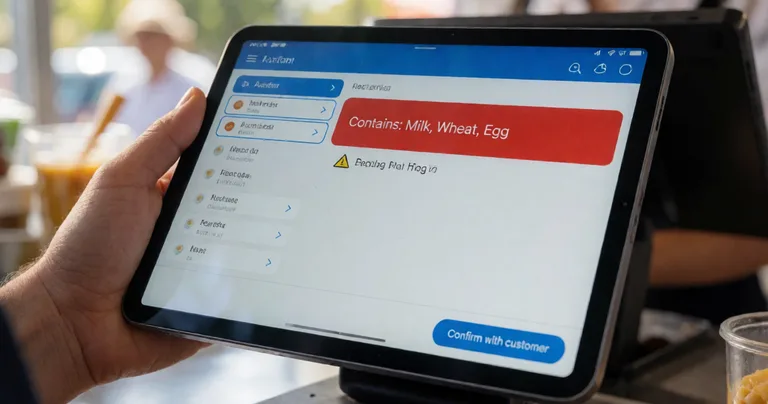
Set up your allergen matrix once, then reuse it across every event. Evntle POS syncs your catalogue across devices, so the same accurate data follows you from market to market.
Allergen Tracking POS Features That Actually Matter
Not all features are equal. When you're comparing POS systems for an Australian food stall, here's what to prioritise.
| Feature | Why it matters at an event | Evntle POS |
|---|---|---|
| Item-level allergen fields | Stops staff relying on memory during a rush | Yes — declared once in store profile |
| Customer-facing allergen warnings | Gives the buyer visibility before they order | Yes — shown on order board and display |
| Order-level alerts | Forces confirmation before sale completes | Yes — in cart and at checkout |
| Offline mode | Markets often have patchy mobile data | Yes — sales sync when back online |
| Multi-device sync | Multiple staff, multiple tills, one menu | Yes — phone, tablet, desktop |
| End-of-day allergen report | Useful for incident review and compliance | Yes — via Event Analytics |
The offline point is bigger than it sounds. We've seen stalls lose sales because the EFTPOS terminal dropped out mid-queue. An allergen tracking POS that keeps working offline means your safety warnings don't disappear when the signal does. For a deeper comparison, see our breakdown of cashless terminals versus mobile POS.
Why customer-facing warnings matter
Most allergen incidents happen because the customer didn't ask, not because the vendor gave the wrong answer. A customer-facing display that shows allergen warnings on the item card gives the buyer a chance to self-identify before they order. That single feature prevents more incidents than any training program.
"The best allergen control isn't a laminated sheet behind the counter. It's a warning the customer sees before they order."
— Evntle operations team
Allergen Tracking POS vs Spreadsheets and Paper Systems
A lot of vendors start with a spreadsheet or a printed allergen sheet. That's fine for a single stall with one operator. It falls apart the moment you scale. Here's how the two approaches compare across a typical event season.
| Scenario | Spreadsheet / paper | Allergen tracking POS |
|---|---|---|
| New staff member joins mid-season | Needs retraining on the sheet; risk of error | Warnings appear automatically on every item |
| Recipe changes | Sheet must be reprinted and redistributed | Update once; warnings update everywhere |
| Multiple tills at a festival | Each till needs its own copy; version drift | All devices sync to the same catalogue |
| Customer asks about cross-contact | Depends on staff memory | Cross-contact notes stored with the item |
| Post-event incident review | Reconstruct from memory and receipts | Full order history with allergen flags |
| Compliance audit | Patchy records, hard to prove | Timestamped, exportable records |
The pattern is consistent: paper works until the operation gets complex. Once you're running more than one stall, more than one staff member, or more than one event per month, the spreadsheet becomes a liability. For a broader look at how integrated tools compare, see integrated event tools versus spreadsheets.
FSANZ requires allergen information to be accurate and accessible at the point of sale for unpackaged food. A POS with structured allergen fields creates a defensible record that a paper sheet can't match.
How Allergen Tracking Fits Into Event Operations
Allergen tracking doesn't live in isolation. It's one part of a bigger event operations picture — vendor onboarding, site planning, POS, and reporting. Here's how the pieces connect for an Australian market or festival.
Vendor onboarding and compliance
When you onboard food vendors through Evntle Vendor Management Software, you can require allergen documentation as part of the application. That means every food stall on your site has declared its allergens before bump-in. No more chasing certificates on the morning of the event.
Site planning and food zones
Allergen risk isn't just per-stall. If you're placing a peanut-heavy satay stall next to a gluten-free bakery, cross-contact risk rises. Evntle Event Site Planning Software lets you map stalls with allergen considerations in mind, so you can separate high-risk vendors from sensitive ones.
Point of sale and order flow
At the till, allergen warnings need to appear without slowing service. Evntle POS shows warnings on the item card and in the cart, and the customer-facing display mirrors them. If you're running a busy food stall, the Evntle Order Board keeps orders visible while the POS handles the allergen flags.
Reporting and incident review
If something goes wrong, you need a record. Evntle Event Analytics captures order-level data, including allergen flags, so you can review what happened and improve. For serious incidents, Evntle Incident Management logs the details with custom forms, severity, and timestamps.

Frequently Asked Questions About Allergen Tracking POS
Q: What is an allergen tracking POS?
A: An allergen tracking POS is a point-of-sale system that stores allergen information for every menu item and displays warnings at the point of sale. It flags allergens on item cards, in the order cart, and on customer-facing displays, so staff and customers both see the risk before a sale is finalised.
Q: How do I track allergens for a food stall at an Australian market?
A: Build an allergen matrix listing every item and its FSANZ allergens, then enter that data into a POS with structured allergen fields. Evntle POS lets you declare allergens once in your store profile, and they appear automatically on every relevant item across all devices.
Q: What's the best POS for food stalls with allergen warnings?
A: The best option is a mobile-friendly POS with item-level allergen fields, customer-facing warnings, offline mode, and multi-device sync. Evntle Food Stall Point of Sale is built for exactly this — it handles payments, menu management, and allergen tracking in one system.
Q: Do I legally need to declare allergens at a market stall in Australia?
A: Yes. Under FSANZ rules, unpackaged food sold at markets must have allergen information available at the point of sale. That means declaring the 11 major allergens when they're present. An allergen tracking POS makes this consistent and auditable.
Q: Can allergen tracking work offline at a market?
A: Yes, if your POS has offline mode. Evntle POS keeps working without mobile data and syncs sales when you're back online, so allergen warnings remain visible throughout the event.
Q: How do I train staff to use allergen warnings at events?
A: Keep it simple. Train staff to confirm with the customer whenever an allergen warning appears. The POS handles the memory work; staff just need to follow the prompt. Run a mock order before event day to make sure everyone's comfortable.
Getting Started With Allergen Tracking POS
Allergen tracking isn't a nice-to-have for Australian food vendors. It's a legal requirement, a safety obligation, and a commercial advantage. Customers remember the stall that made them feel safe. They come back. They tell their friends.
The good news is that setting it up is straightforward. Build your allergen matrix. Load it into a POS that supports item-level allergen fields. Train your staff on the alert flow. Test before event day. Then get on with the thing you actually love — serving great food to a crowd that trusts you.
Evntle POS gives you allergen tracking, cashless payments, multi-device sync, and live sales visibility in one platform. If you're running food stalls at markets or festivals, start with Evntle Food Stall Point of Sale and see how much calmer event day feels when the warnings are built in.
Allergen tracking POS turns a high-risk, memory-dependent process into a reliable, auditable system. For Australian event vendors, that's the difference between hoping you got it right and knowing you did. Declare once, warn everywhere, and keep your customers safe — every single service.